
Whitelabel
Replaces GLPI’s name, logos and favicon with your own. For anyone handing the interface to people who have never heard of GLPI.
Requires GLPI 11.0. No tables, no dependencies, nothing to reapply after an upgrade.

What it changes
Section titled “What it changes”- Application name — browser tab on every page, the footer of every notification, and the entry a two-factor app stores against an account. All three come from one core setting.
- Logos — sidebar, collapsed sidebar, login card, About dialog, in both light and dark themes.
- Favicon.
- Name of the built-in login source.
- Version and copyright line (optional).
- Help links, through core’s own settings.
Anything left unconfigured keeps GLPI’s own value.
Install
Section titled “Install”# from the GLPI root — the directory must be named for the plugin key,# which is not the repository namegit clone https://github.com/bijstaan/glpi-whitelabel.git plugins/whitelabelphp bin/console plugin:install -u glpi whitelabelphp bin/console plugin:activate whitelabelSettings
Section titled “Settings”Setup → Plugins → Whitelabel.
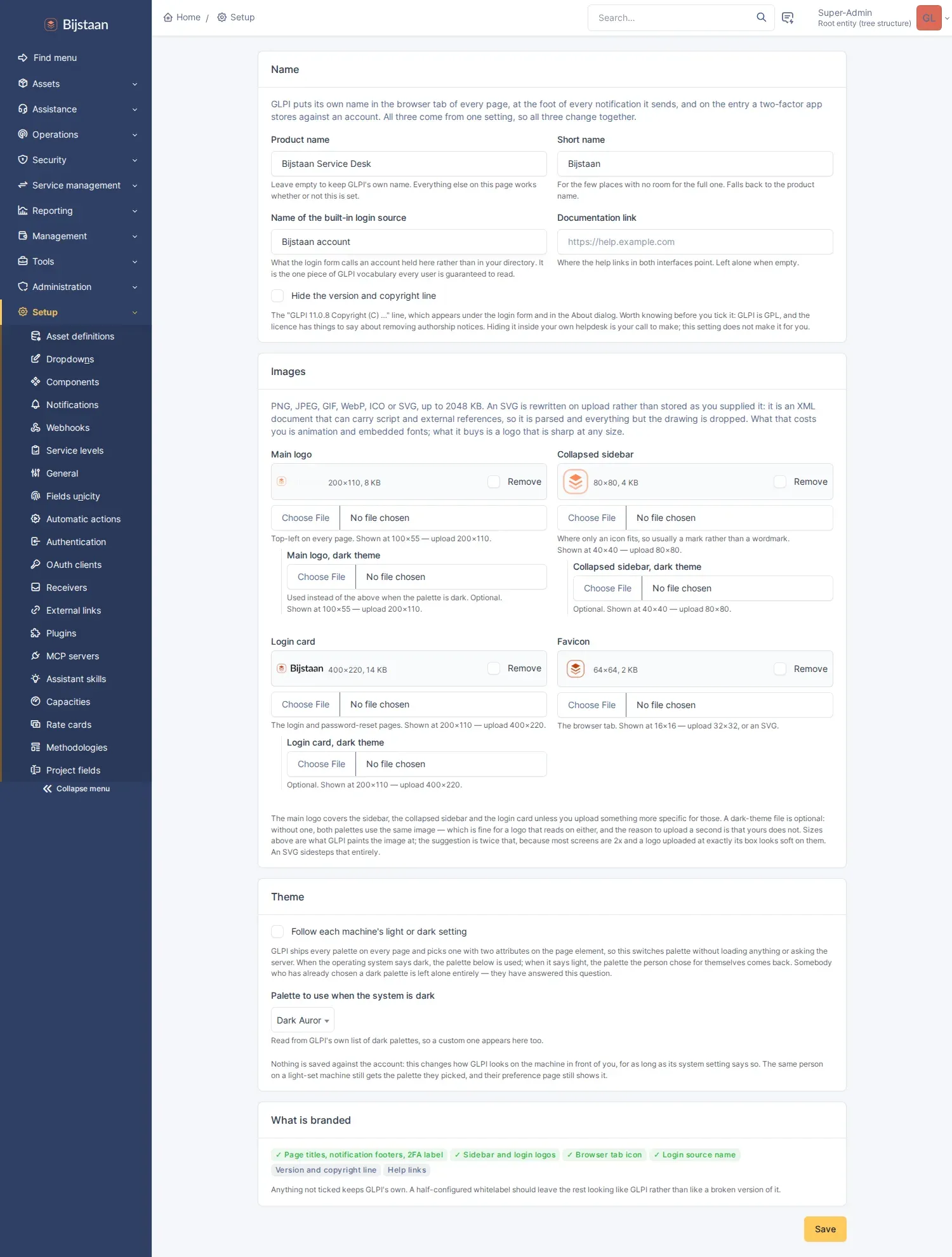
Images are written to GLPI’s plugin document directory, which is already writable, outside the web root and covered by backups. The config table stores only the name and which images exist, so reading settings never means reading a megabyte of base64.
SVG uploads are rejected. An SVG can carry script, and served from GLPI’s own origin that is stored XSS. Accepted formats are PNG, JPEG, GIF, WebP and ICO, decided by reading the file header rather than the filename.
Hiding the copyright line is a setting, off by default. GLPI is GPL and the licence has something to say about removing authorship notices, so the choice is left explicit.
Implementation notes
Section titled “Implementation notes”- The name is
$CFG_GLPI['app_name'], set during plugin init. The logos are CSS custom properties. Neither needs to know which template renders what. - The plugin stylesheet is injected above core’s CSS links, so a rule on
:rootwould lose to core’s identical rule further down. It uses:root:rootto win on specificity without spending!important. - Core writes its favicon
<link>after anything a plugin can inject, and browsers disagree on whether the first or last icon wins, so the JS half removes core’s rather than just adding one. - That JS never searches the page for the string “GLPI”. Every replacement is anchored to a selector identifying core’s chrome, so a ticket, KB article or entity name containing the word is left alone.
- Plugin scripts serving the stylesheet and images are marked public via
Firewall::addPluginStrategyForLegacyScripts(). Without it GLPI 11 requires authentication for legacy plugin scripts, the login page gets an access-denied page in place of its stylesheet, and the session is torn down. - The settings form has no
actionattribute. Under GLPI 11’s front controller$_SERVER['PHP_SELF']is/index.php, so a form pointing at it saves nothing and appears to succeed. - Renaming the login source needs the JS half: GLPI renders that select through
select2, which builds its own element and ignores changes to the
<option>.
cd tests/browser && SHOT_DIR=../../docs/screenshots node wl-check.jsBrowser only — every claim this plugin makes is about what a page looks like. The check drives the settings form including uploads, reads back the login page, technician interface and portal, then removes the branding and confirms GLPI’s own name and face return. It writes the screenshots used in this README.
Layout
Section titled “Layout”setup.php app_name, asset hooks, firewall strategieshook.php install/uninstall: one right, no tablessrc/Settings.php the brand, and the head tags carrying itsrc/Assets.php uploads: validated by header, stored outside the web rootsrc/Brand.php the generated stylesheetfront/config.php settings pagefront/style.php stylesheet, public by designfront/asset.php one image, public by designpublic/js/whitelabel.js favicon, and the text CSS cannot reachIndependence
Section titled “Independence”We have never had a GLPI Network subscription. We have not seen the source of GLPI’s “Exclusive” plugins, or their screens, or their docs. Nothing in here came from them.
It was built from GLPI’s own source, which is GPL and public, and from its API. That is the whole list.
If it looks like theirs in places, that is because core only gives you so many places to hook into.
GLPI is a trademark of Teclib’. This plugin is not affiliated with Teclib’ or the GLPI project.
Licence
Section titled “Licence”GPL-3.0-or-later, the same licence as GLPI. The plugin is loaded into GLPI’s process and extends its classes, so it is a derivative work. See LICENSE.