
GLPI SOP
Interactive, admin-authored standard operating procedures on GLPI 11 tickets, changes and problems.
An administrator writes a procedure once. It attaches itself to the tickets it applies to, asks the technician the questions that are relevant, and records what was answered — by whom, when — on the ticket itself.
What makes it more than a checklist field
Section titled “What makes it more than a checklist field”- Steps are typed. Fourteen types: checkbox, number, date, a fixed set of answers, a user, an asset, a file, and more. Answers are stored as data, so “was the serial recorded” is a query rather than a reading exercise.
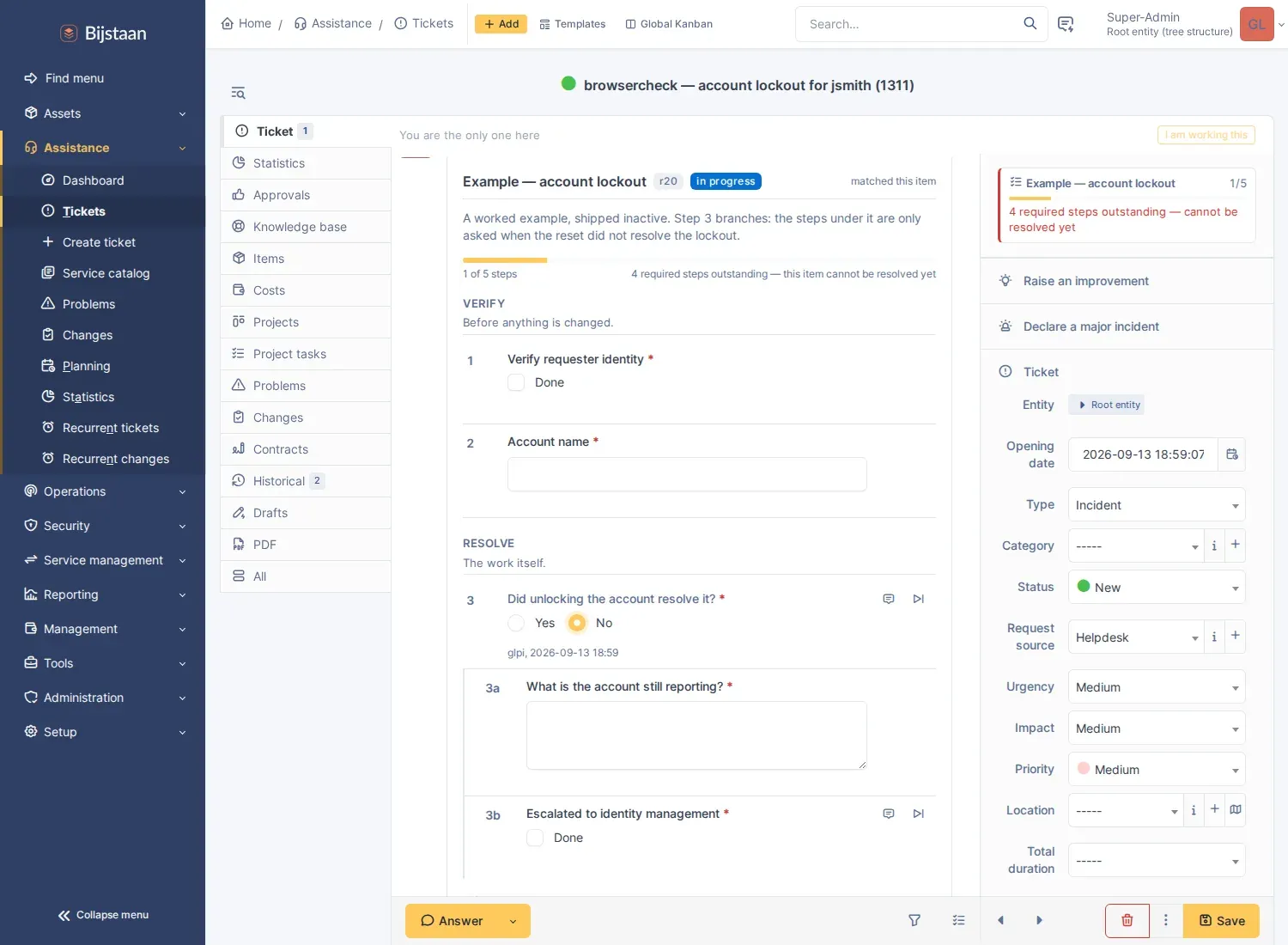
- The checklist is a timeline entry, in the ticket’s own record beside the followups it explains, not behind a tab. A standing one-line reminder in the fields panel says what is outstanding and links to it.
- Steps are conditional, gated on a list of conditions joined by all-of or any-of. A step that is not being asked is not outstanding: it does not count towards completion and cannot hold the ticket open. Without that rule a branching procedure’s completion count is a lie.
- Procedures find the ticket, not the other way round.
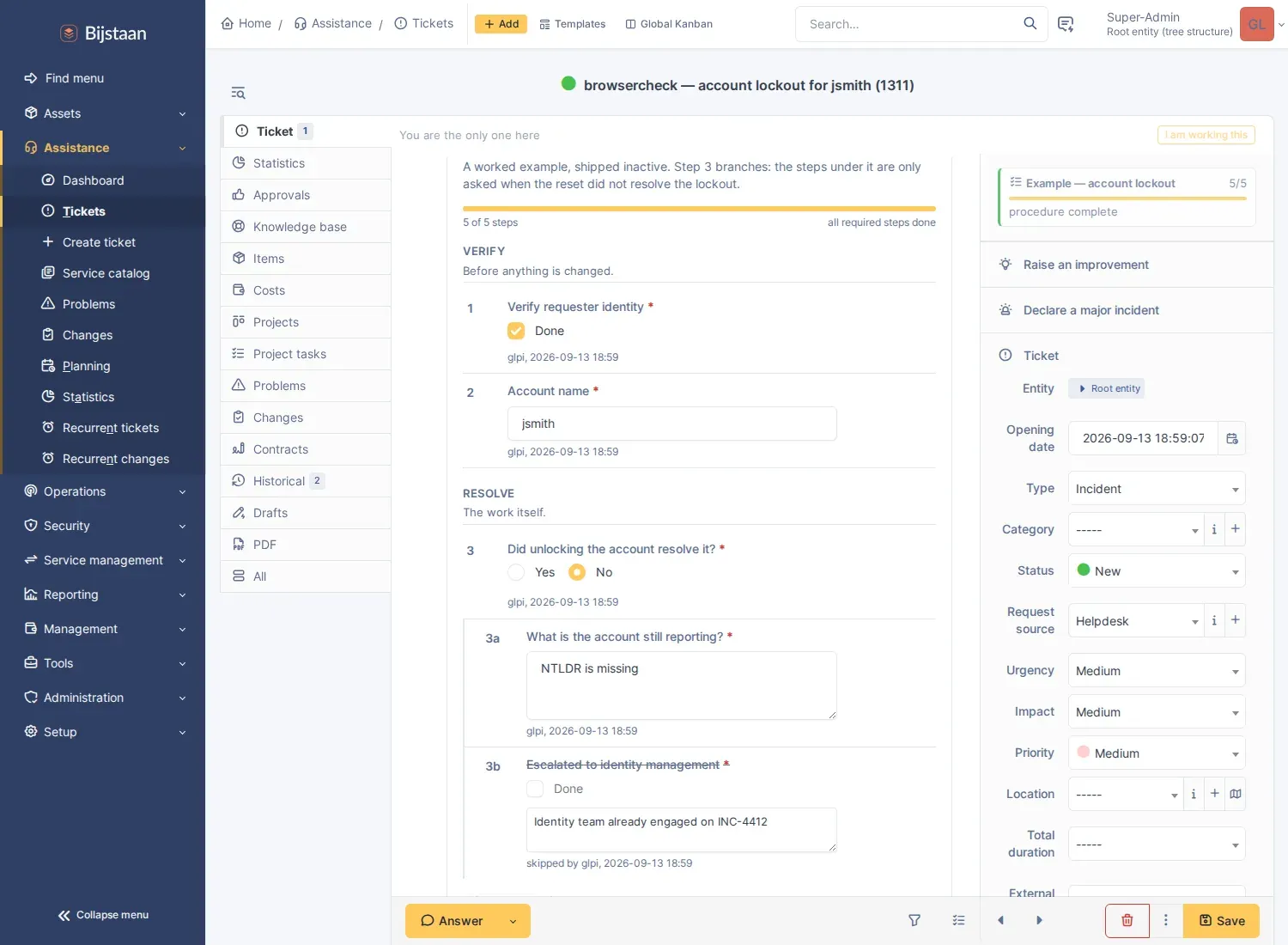
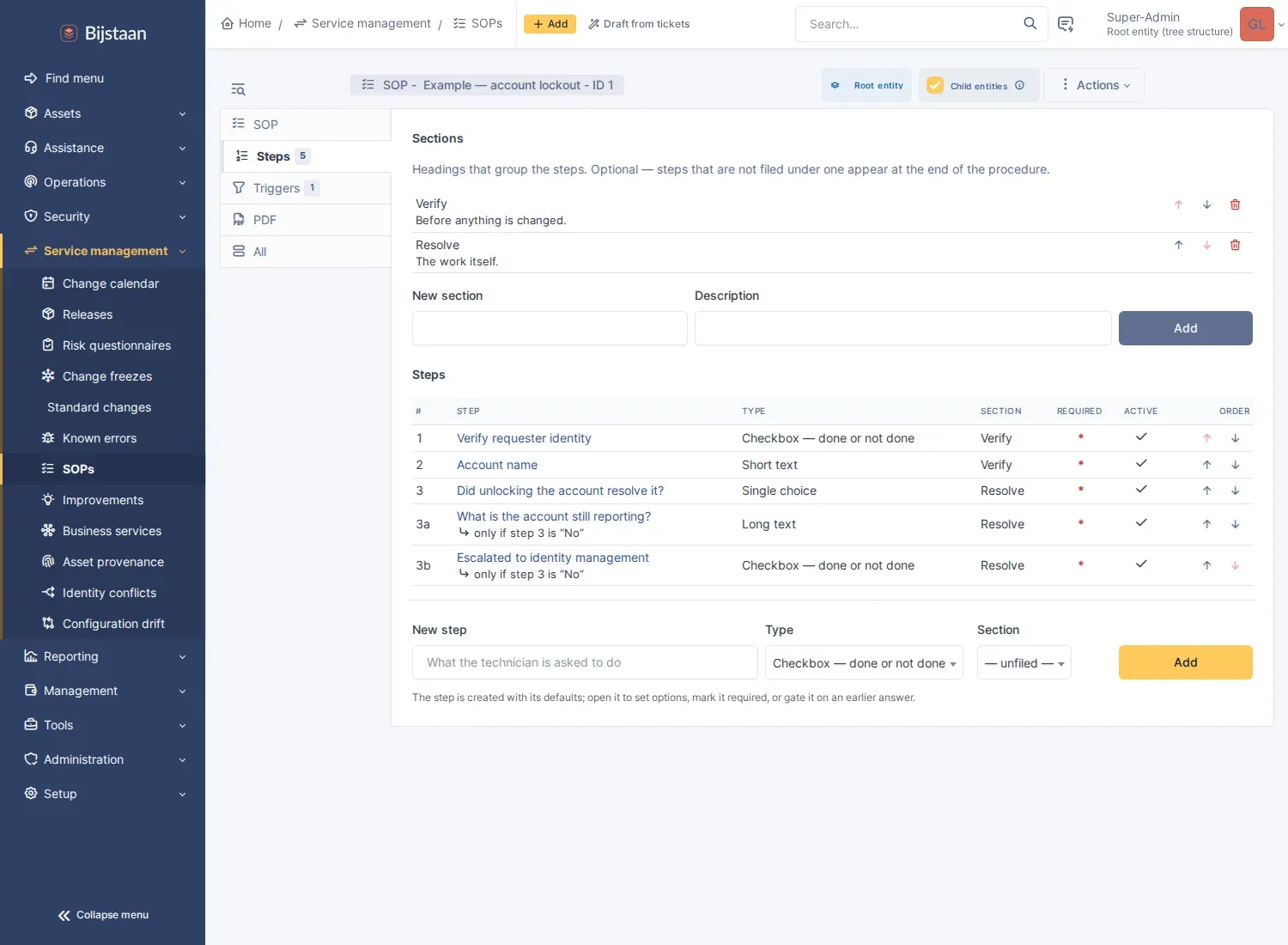
Answer Yes at step 3 and 3a/3b are never asked: the run is complete at 3 of 3. Answer No and they appear in place with no reload, and the run reopens.
Features
Section titled “Features”-
Authoring — sections and steps, per-step guidance, required flags, and a gate of one or more conditions. Steps and headings reorder with arrows. Every structural edit bumps the SOP’s revision, and each run records the revision it started against.
-
Conditions from three places, combined with all/any:
- an earlier answer in this run — was answered, is, is not, is greater than, is less than;
- a field of the item — the same criteria the triggers offer;
- an approval on the item — its status, or whether a named person or a member of a named group granted one.
-
Approval as a step, with no control to tick. Satisfied when the item’s own approval reaches the required state (approved, waiting, refused), optionally by a named person or group member, and back to outstanding if that approval is withdrawn or refused.
-
Work that belongs to somebody else, as a step: a
ticketstep raises a linked child ticket with title and description templated and category and assignee group preset, and either counts itself done at that point or waits until that ticket is solved. -
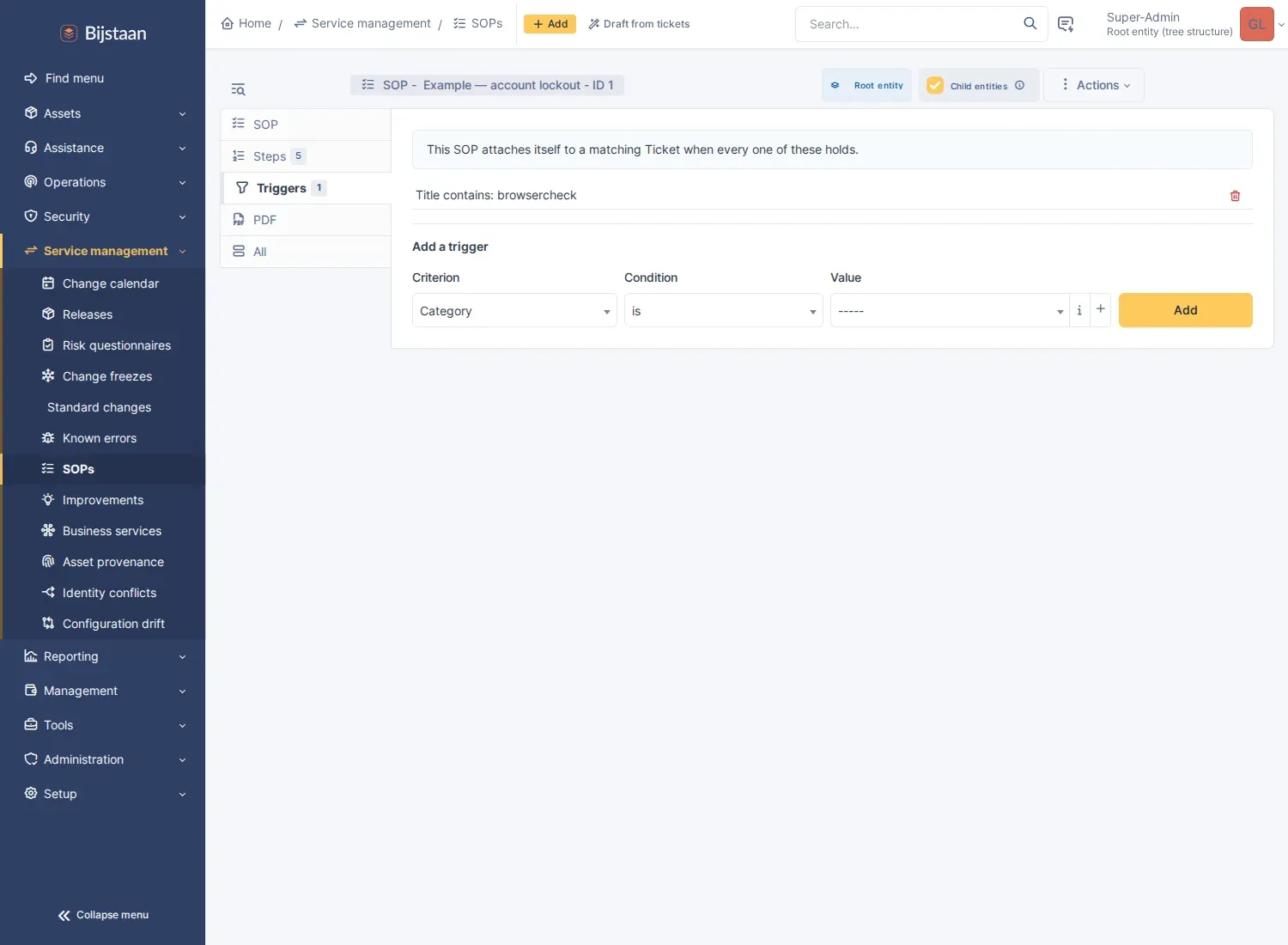
Attachment, three additive ways: the SOP’s own triggers (category, type, urgency, impact, priority, request source, location, entity, requester or assignee group, title, description — matched with is / is-not / is-under / contains / regex); a binding on the ITIL template; or an Attach an SOP action in GLPI’s own business rules.
-
Running — saves itself as it is filled in, so closing the browser halfway loses nothing. Steps can be skipped with a recorded reason, annotated, or cleared.
-
Enforcement, optional per SOP: an outstanding required step refuses both doors to resolution, the status change and filing a solution. The Solution action and the Solved/Closed statuses grey out with the reason on hover. The refusal is server-side and stands on its own; greying out is a courtesy.
-
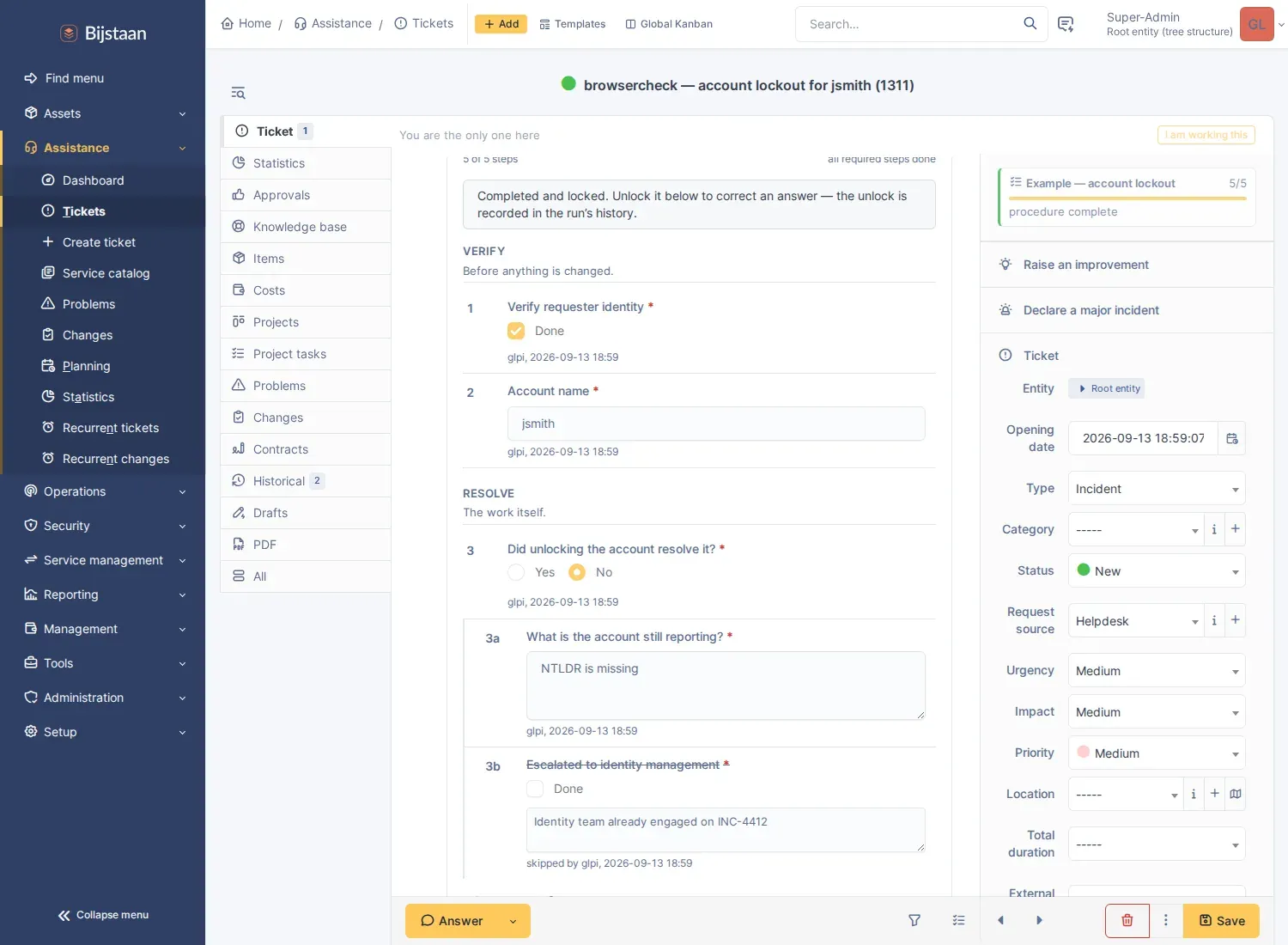
Locking — a run locks itself on completion. Unlocking is one click, and both the unlock and re-lock go into the run’s history.
-
An append-only history of every answer, change, skip, unlock and completion. A run can additionally transcribe itself into a followup.
-
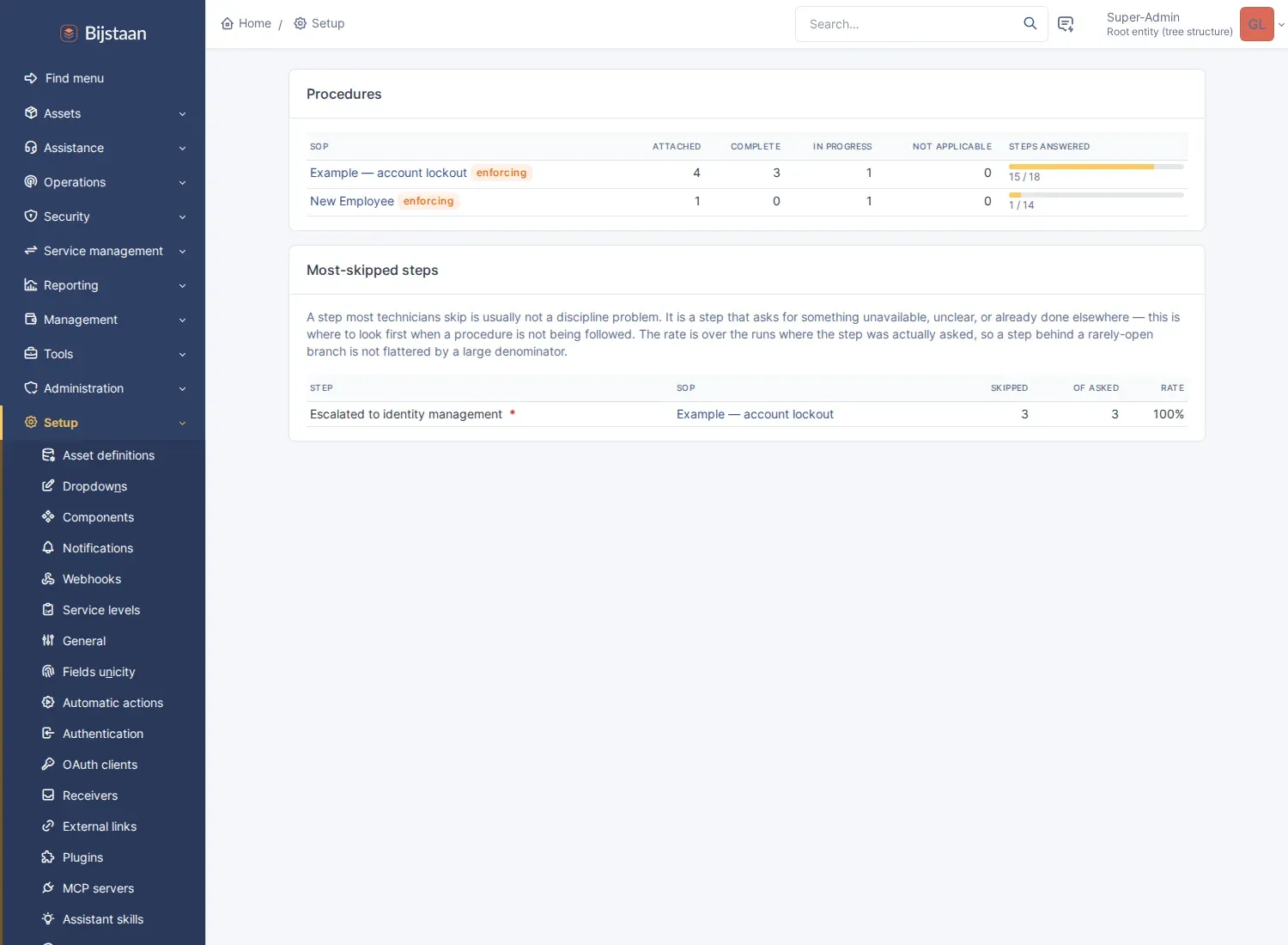
Adoption reporting — runs and completion per SOP, plus a most-skipped steps table. A step most technicians skip usually asks for something unavailable, unclear, or already done elsewhere.
Technician (central) interface only. Requesters never see a procedure or its answers.
Install
Section titled “Install”# from the GLPI rootgit clone https://github.com/bijstaan/glpi-sop.git plugins/glpisopphp bin/console plugin:install -u glpi glpisopphp bin/console plugin:activate glpisopInstalling seeds one example procedure, Example — account lockout, inactive and non-attaching, so nothing appears on anybody’s tickets until you publish it.
Using it
Section titled “Using it”Author at Setup → SOPs, or Service management → SOPs where glpinav is
installed.
| Tab | What goes there |
|---|---|
| SOP | name, which itemtypes it applies to, whether it attaches itself, whether it blocks resolution |
| Steps | sections and steps; open a step for its type options, required flag, or gate |
| Triggers | the criteria under which it attaches itself, joined with AND or OR |
Bind an SOP to a ticket template from the template’s own SOPs tab (Setup →
Templates). Attach one from a business rule by adding the Attach an SOP
action to a RuleTicket / RuleChange / RuleProblem.
Run it from the ticket. The checklist appears in the timeline as soon as the procedure attaches; the reminder above the Status field shows progress, warns when resolution is blocked, and jumps to the checklist when clicked.
Drafting a procedure from tickets
Section titled “Drafting a procedure from tickets”Setup → SOPs → Draft from tickets. Needs glpiai installed, configured with a
provider, and this entity permitted by its tenant gate.
Pick a category and a window; the page lists the tickets resolved in it and what is written on each. Untick the ones that are not really the same problem, and press the button. What comes back is a real SOP, switched off, with steps, headings and a category trigger already on it.
The category is the cluster. An SOP attaches on category, so a procedure drafted from the last dozen tickets in one has a trigger that is the same thing that chose its evidence. A category can also be a dumping ground, so that judgement is asked of the model, which can answer “these are not one procedure”.
It arrives inactive, and that is the measurement. Somebody switching it on is the accept, and the same page reports what became of the earlier ones: how many were switched on, how many deleted, and how many proposed steps survive. “Nine of twelve steps kept” says something an accept rate cannot.
It will not:
- Invent a step type nobody implements. The list offered to the model is the allowlist its answer is checked against; anything else is dropped and reported rather than failing the whole draft.
- Propose workflow.
ticketandapprovalsteps are answered by somebody other than the technician. - Draft from nothing. A ticket carrying only a title contributes nothing and is unticked for you; below the configured minimum the button refuses.
- Publish. Inactive,
is_autoattachoff, trigger inert until both are on.
The tickets are sent to whichever provider glpiai is configured with, so this has its own switch on the settings page on top of glpiai’s per-entity gate.
glpi-ai tools
Section titled “glpi-ai tools”Reading, always available:
| Tool | Answers |
|---|---|
sop_progress |
What the checklist on this ticket says: done, skipped, outstanding, and what blocks a solve |
sop_library |
Which procedures exist for this kind of work, their steps, and what would make each attach |
Writing, needing write tools enabled in glpiai and plugin_glpisop_sop at
create or update:
| Tool | Does |
|---|---|
sop_create |
Writes a new procedure from what the technician dictates |
sop_add_steps |
Appends steps under an existing heading or a new one |
sop_update_step |
Rewords a step, changes whether it is required, or retires it |
sop_update |
Renames a procedure, rewrites its description, changes its itemtypes |
Three rules hold across all four writers:
- Nothing is activated. A created procedure is inactive and attaches to nothing, and no tool can change either flag. Activation is what turns a document into something that can hold a queue’s tickets open, and it is also the only accept signal a drafted procedure has.
- Nothing is deleted. A step can be retired, keeping it and every answer recorded against it, reversible in one click.
- A step type nobody implements is dropped and said so. One definition in
StepWriter, shared with the drafting prompt.ticketandapprovalare never offered.
The four writers are not declared on every request: past glpiai’s tool-search
threshold only pinned tools go to the model up front, and these carry this
plugin’s largest schemas for a rare turn. The two readers stay pinned, so the
model always knows the site has procedures. find_tools ranks sop_create
first for “write this up as a procedure”.
Permissions are checked twice: glpiai refuses the tool before the handler runs if
the user lacks the right, and each handler re-loads the procedure and calls
can(UPDATE), which is what applies the entity restriction.
Settings
Section titled “Settings”Setup → Plugins → GLPI SOP, or Setup → SOP checklists.
| Setting | Default | Notes |
|---|---|---|
| Itemtypes | Ticket, Change, Problem | Where SOPs may be attached at all |
| Evaluate SOP triggers | yes | Master switch for trigger matching |
| Re-evaluate when an item changes | yes | Triage is where the category is still wrong, and where most real attachments happen |
| Let SOPs block resolution | yes | Gates the per-SOP flag; one switch to undo a misconfigured procedure |
| Let technicians skip a step | yes | A skip is recorded as an explicit “not done”, never as an answer |
| Require a reason to skip | yes | The reason lands on the record and in the completion followup |
| Lock a run as soon as it completes | yes | Unlocking is one click, and logged |
| Freeze a completed run after | 0 days | Age-based, and unlike the lock it has no key. 0 disables it |
| Also transcribe the run into a followup | no | See below |
| That followup is internal | yes | SOP answers are written for colleagues |
| Allow procedures to be drafted from resolved tickets | yes | Inert without glpiai; sends ticket content to its provider |
| Look back | 180 days | |
| Read at most | 12 tickets | Past a dozen the shared shape stops getting clearer while the prompt grows |
| Refuse below | 4 tickets | Below this there is no pattern to find |
Let SOPs block resolution only enables the per-SOP enforce_on_solve flag,
which itself ships off.
The completion followup is off by default: the checklist is a timeline entry, so a followup repeating it duplicates rather than reveals. What it still buys is durability — plain ticket data that survives this plugin being removed and reaches notification emails and printed exports.
Rights
Section titled “Rights”| Right | Grants |
|---|---|
plugin_glpisop_sop |
Authoring procedures, triggers and bindings |
plugin_glpisop_run |
Answering a checklist on an item |
Granted at install to profiles that can already update config and ticket
respectively. Answering additionally requires update access to the item itself.
The checklist is reachable from glpimobile over the high-level API, because a
good share of this work happens in a comms cabinet rather than at a desk.
| Method | Path | Purpose |
|---|---|---|
GET |
/GlpiSop/item/{itemtype}/{items_id}/runs |
the procedures attached to a ticket, with counters |
GET |
/GlpiSop/runs/{id} |
one run: sections, steps, answers, visibility, progress |
POST |
/GlpiSop/runs/{id}/steps/{steps_id}/answer |
answer a step |
POST |
/GlpiSop/runs/{id}/steps/{steps_id}/clear |
un-answer it |
POST |
/GlpiSop/runs/{id}/steps/{steps_id}/skip |
skip it with a reason (again to un-skip) |
POST |
/GlpiSop/runs/{id}/steps/{steps_id}/note |
write or erase its note |
POST |
/GlpiSop/runs/{id}/steps/{steps_id}/spawn |
raise the ticket a ticket-step asks for |
GET |
/GlpiSop/runs/{id}/log |
the run’s history |
- Every write answers with the whole run, recomputed. One answer can open a branch, close another, complete the run and unblock the ticket; none of that is derivable on a client.
- Validation stays server-side.
StepType::normalize()decides whether an answer is acceptable, and its refusals come back as422with the message it wrote. A step marked done is a compliance claim. - The step is checked against the run’s own SOP, and the item re-derived from the run. A run id arrives from a client; without both this would let anyone edit the procedure on any ticket from a guessed id.
Steps whose answer lives elsewhere (approval, and pickers a phone does not
have) are sent with their state and rendered read-only rather than hidden.
Document steps are answerable by documents_id, pairing with glpimobile’s upload
endpoint.
Feature discovery goes through glpimobile_capabilities: runs (READ on
plugin_glpisop_run) and answer (UPDATE), separate because a read-only
technician has a use for the first.
cd tests/browsereval "$(./sop-setup.sh)" # publishes the example SOP, raises a matching ticketTICKET_ID=$TICKET_ID SHOT_DIR=. node sop-check.jsDrives the checklist in a real browser: a control saving itself on change, a text field saving on a pause rather than per keystroke, a branch opening and closing in place without a reload, skipping demanding a reason first, and the completion followup reaching the timeline. It renders the authoring tabs and the adoption page, fails on any JavaScript error, and produces the screenshots above.
Three things to know before reading the code: visibility is computed only on the
server, the unique key on runs is essential for consistency, and GLPI
11’s CSRF behaviour makes X-Requested-With mandatory on a fetch().
Licence
Section titled “Licence”GPL-3.0-or-later, the same licence as GLPI. The plugin is loaded into GLPI’s process and extends its classes, so it is a derivative work. See LICENSE.