
GLPI Nav
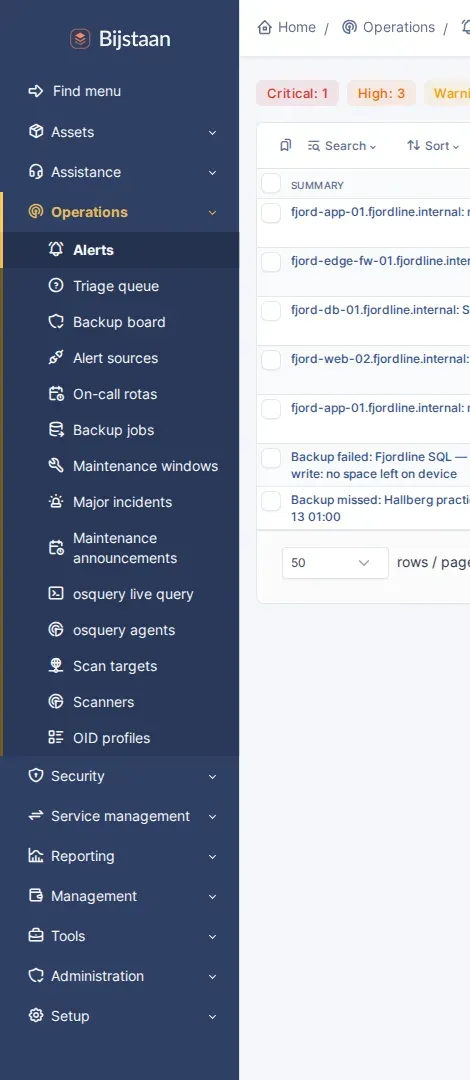
Gives the Bijstaan suite its own top-level sections in GLPI’s central sidebar, instead of twenty-odd entries scattered through Tools, Setup, Administration and Management.
A coordinator, not a feature: it owns no tables, adds no pages beyond its
settings screen, and never creates a menu entry. It only moves ones core already
built, through Hooks::REDEFINE_MENUS.
The problem it solves
Section titled “The problem it solves”menu_toadd appends an itemtype to one of core’s seven fixed sectors. A plugin
cannot create a sector or ask for one. With a suite installed that produces:
| Sector | What ends up there |
|---|---|
| Administration | LDAP, profiles, entities … and alert sources, on-call rotas, backup jobs, the triage queue, identity conflicts, configuration drift |
| Setup | mail receivers, OAuth clients, automatic actions … and change freezes, standard changes, known errors, major incidents |
| Tools | reminders, RSS, saved searches … and the vulnerability dashboard, the change calendar, releases, report definitions |
The grouping describes which plugin supplied a page rather than what a technician is doing. Core offers no setting, profile option or hook that reorders the sidebar.
Sections
Section titled “Sections”Four, inserted after Assistance by default:
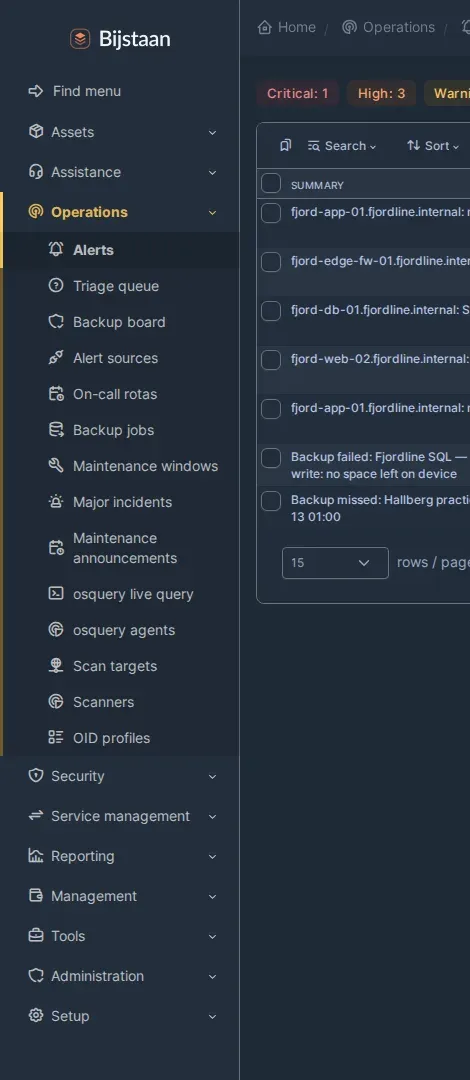
- Operations — alerts, triage, backup board, alert sources, on-call rotas, backup jobs, maintenance windows, major incidents, maintenance announcements, the osquery live query console and agent fleet, scan targets, scanners, OID profiles
- Security — vulnerability exposure dashboard, advisories, EOL, review queue and exceptions; osquery fleet compliance
- Service management — change calendar and success rate, releases, risk questionnaires, change freezes, standard changes, known errors, SOPs, improvements, business services, asset provenance, identity conflicts, configuration drift
- Reporting — report definitions, generated reports
All configurable: sections can be renamed, re-iconed, reordered, hidden, or anchored after a different core sector; entries can be reassigned or left where their plugin filed them, and relabelled. There is a Reset to defaults button. Saving takes effect on the next page render, not the next login.
Moving an entry is two changes, not one
Section titled “Moving an entry is two changes, not one”Html::header($title, $url, $sector, $item, $option) is not decoration. GLPI
resolves three things by looking those arguments up in the menu array:
- the breadcrumb, from
menu[sector]['title']andmenu[sector]['content'][item] - the Add button, from
menu[sector]['content'][item]['options'][option]['links']['add'](templates/layout/parts/context_links.html.twig) - the sidebar highlight, both levels, by comparing titles
Move an entry while its pages still name the old sector and all three vanish, with the page rendering fine and reporting nothing. Measured across thirteen pages: every one lost its Add button, breadcrumb entry and highlight.
So a movable entry is one whose pages ask where they live:
$sector = class_exists(Nav::class) ? Nav::sector(KnownError::class, 'config') : 'config';Html::header(KnownError::getTypeName(2), $_SERVER['PHP_SELF'], $sector, KnownError::class);The class_exists() guard and the fallback argument keep that line safe without
this plugin installed, switched off, or with the entry left in place.
Title matching has a second edge: two entries with the same name in one section both highlight, on either page. Hence the per-entry label override and the settings-page warning when two names collide.
Install
Section titled “Install”# from the GLPI rootgit clone https://github.com/bijstaan/glpi-nav.git plugins/glpinavphp bin/console plugin:install -u glpi glpinavphp bin/console plugin:activate glpinavUninstall removes five config rows and one right. The stock layout returns because the transform stops running and every patched page falls back to the sector it already names.
Settings
Section titled “Settings”Setup → Plugins → GLPI Nav. Needs plugin_glpinav_config, granted at
install to profiles holding core config UPDATE.
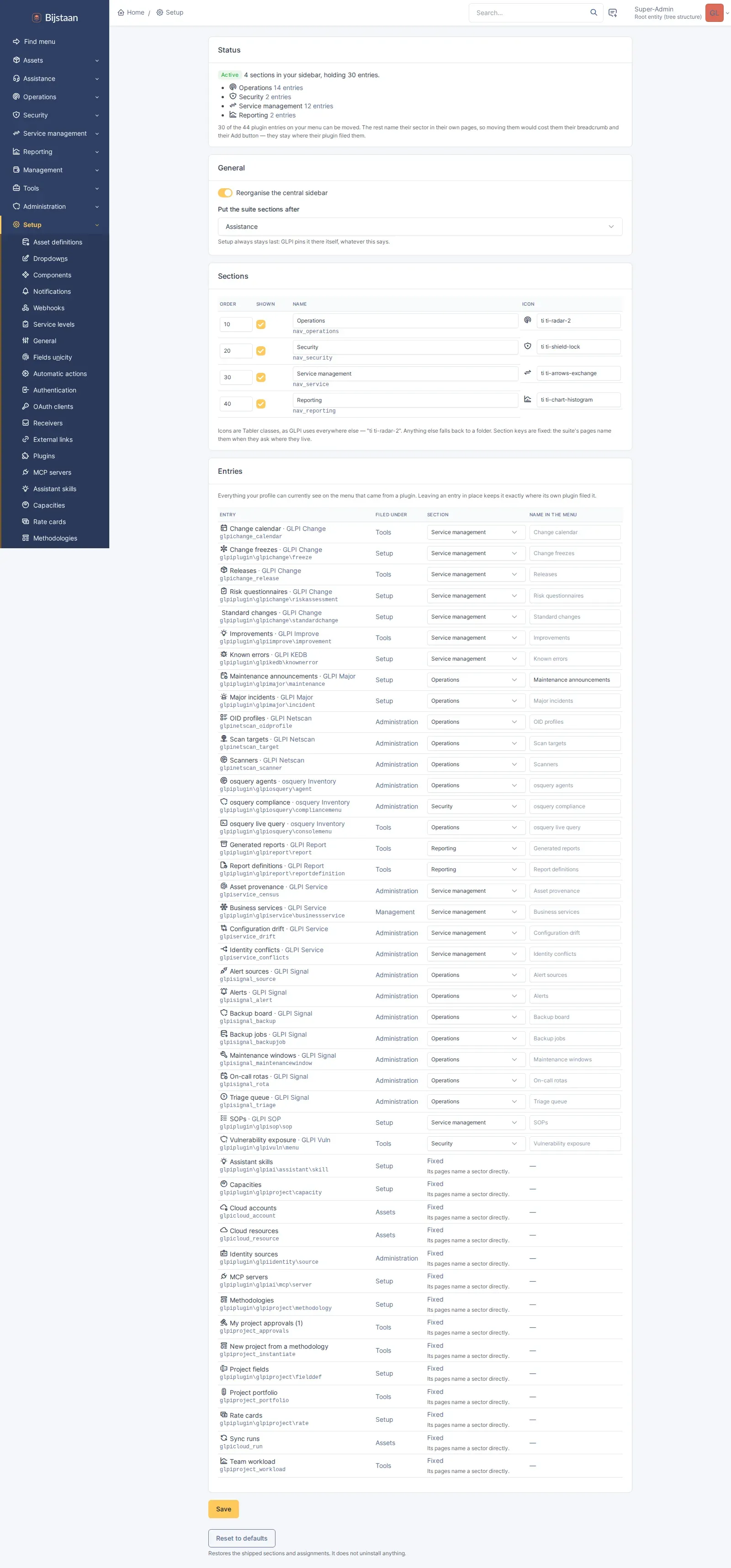
| Setting | Default | What it does |
|---|---|---|
| Reorganise the central sidebar | on | Master switch. Off leaves GLPI’s layout untouched |
| Put the suite sections after | Assistance | Which core sector the sections follow. Setup stays last; core pins it |
| Sections | four, as above | Order, visibility, name, Tabler icon. Keys are fixed — 51 pages name them |
| Entries | as above | Per entry: which section (or leave in place), and the label to show |
Limitations
Section titled “Limitations”- Central interface only. The helpdesk portal is untouched by design.
- Not every entry can be moved. glpiai’s MCP servers and Assistant skills,
and glpiidentity’s sources, name their sector directly in their pages. They
are listed as Fixed on the settings page. A plugin that adopts the
Nav::sector()call above becomes movable by adding its keys toRegistry::MOVABLE. - It cannot reveal anything. Entries are moved, never created, so a section is exactly as visible as its contents, and one whose contents a profile cannot see is not rendered at all. This is not a substitute for a profile.
- Section membership is per instance, not per profile.
Html::getMenuSectorForItemtype()still answers with the stock sector — it reads thetypeslist, which the transform leaves alone. Core uses it only for item templates and manual links.
Licence
Section titled “Licence”GPL-3.0-or-later, the same licence as GLPI. The plugin is loaded into GLPI’s process and extends its classes, so it is a derivative work. See LICENSE.