
GLPI Identity
OpenID Connect sign-in and SCIM 2.0 provisioning for GLPI 11, with each entity bringing its own identity provider.
A GLPI instance can hold several organisations’ people. Each can sign in with their own IdP, be provisioned into their own entity by their own SCIM connector, and land in the GLPI groups and profiles that a mapping says their directory’s groups mean.
No new dependencies: GLPI already ships league/oauth2-client,
firebase/php-jwt and ramsey/uuid.
Features
Section titled “Features”- Sign-in — OIDC authorisation-code flow with PKCE, against as many providers as you have organisations. The login page takes an email address and routes on its domain; a “house” provider covers your own technicians.
- Provisioning — a SCIM 2.0 endpoint per source, with its own bearer token, writing only into that source’s entity.
- Mapping — rules turning what a directory says into what GLPI does: groups contains Executive → add to the VIP group, groups is IT Staff → grant the Technician profile, department is Field Services → set their location to the depot.
- An audit trail of who signed in, what was provisioned and what was refused.
identity_statusandidentity_eventsread-only tools forglpiai.
OIDC only, no SAML. Every provider you are likely to meet speaks OIDC, and SAML would mean vendoring an XML-signature library into a GLPI install — and XML signature verification is the one place a subtle mistake is a silent authentication bypass rather than an error.
The safety model
Section titled “The safety model”Worth reading before the setup instructions, because it is what makes it safe to hand an outside organisation a credential that writes into your GLPI.
Identity is not email. Addresses change on marriage and rebrand, get reused
when someone leaves, and belong to whoever controls the domain today. Every
lookup goes through a link — a record that this GLPI user came from that
source, keyed on the directory’s own identifiers (an OIDC sub, a SCIM
externalId). Nothing is matched on email alone; an email match across sources
is how one organisation’s directory ends up owning another’s account, and it would
look like an ordinary successful login.
A directory never adopts an account it does not own. A SCIM create naming a
username that already exists outside this source is answered 409 uniqueness,
and the equivalent sign-in is refused. Without that, provisioning a user called
admin would be a privilege escalation with a REST API in front of it.
Everything is scoped through the source. A SCIM request resolves to exactly one source before anything else, and the only way to reach a user is through that source’s links. Tenant isolation is a property of the structure rather than of each handler remembering to filter, and it is tested from the wrong side with one organisation’s token asking for another’s people.
Only what the plugin granted can be taken away. Profiles and groups it
assigns are marked is_dynamic and recomputed on every sign-in and SCIM change.
Anything an administrator granted by hand is left alone.
Mappings can only write descriptive fields — an allowlist, not a denylist:
location, title, category, phone, administrative number, comments. The
interesting fields on a GLPI user are authtype, password, is_active and
profiles_id, and a mapping engine that could reach them would be a way for a
directory to disable an administrator.
Deprovisioning never purges. Deactivate or move to the bin, both recoverable. A GLPI user is referenced by every ticket they raised or solved.
Keep the password form on, longer than feels necessary. The configuration that fixes a broken identity provider lives inside the instance that provider is the only way into.
The “clear your cookies” failure
Section titled “The “clear your cookies” failure”A widely-met bug in SSO plugins for GLPI: you sign in, land in GLPI, and the next page says your session cannot be validated. Signing in again does the same. Clearing cookies fixes it.
Session::checkValidSessionId() runs on every request and checks a session key
called glpi_remote_user, set when somebody authenticates through GLPI’s
built-in EXTERNAL mode. Once present, the check demands the configured SSO
variable still match it on every request — and Session::init() deliberately
preserves the key across the session regeneration it performs at login. So a
browser that has ever held such a session carries the key forward through every
subsequent sign-in by any method.
This plugin does three things about it:
- It never authenticates through EXTERNAL mode. It verifies an id token
itself and calls
Session::init()directly, so it never sets that key. - It removes the key and two like it before establishing a session —
phpCASand a half-finishedglpi_password_expiredflow. A session established here is not a remote-user session and not a CAS session, so those markers are not merely stale, they are untrue. - It checks the session will survive before handing it over: user id,
valid_id, an active profile and an active entity. If any is missing the session is destroyed and the sign-in refused with a reason.
There is a fourth, structural reason it cannot get stuck: sso.php runs with
GLPI’s session check turned off, so a user whose session is broken can always
start a fresh sign-in.
The regression test plants a poisoned session the way GLPI’s own EXTERNAL auth would, signs in through it, and asserts the two requests afterwards still work. Removing the purge turns it red.
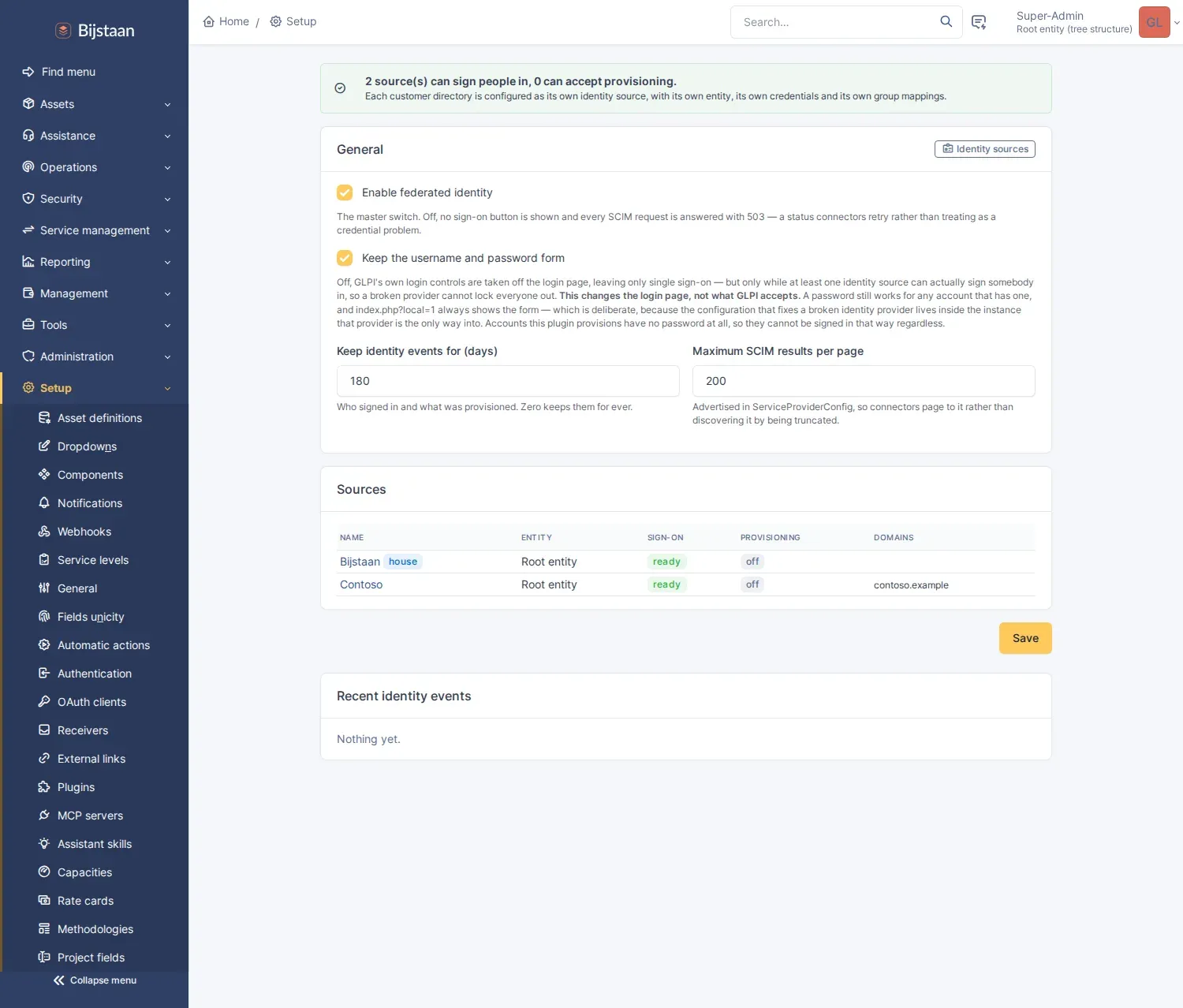
Setup → Plugins → GLPI Identity for the instance-wide switches:
Administration → Identity sources, one per organisation’s directory:
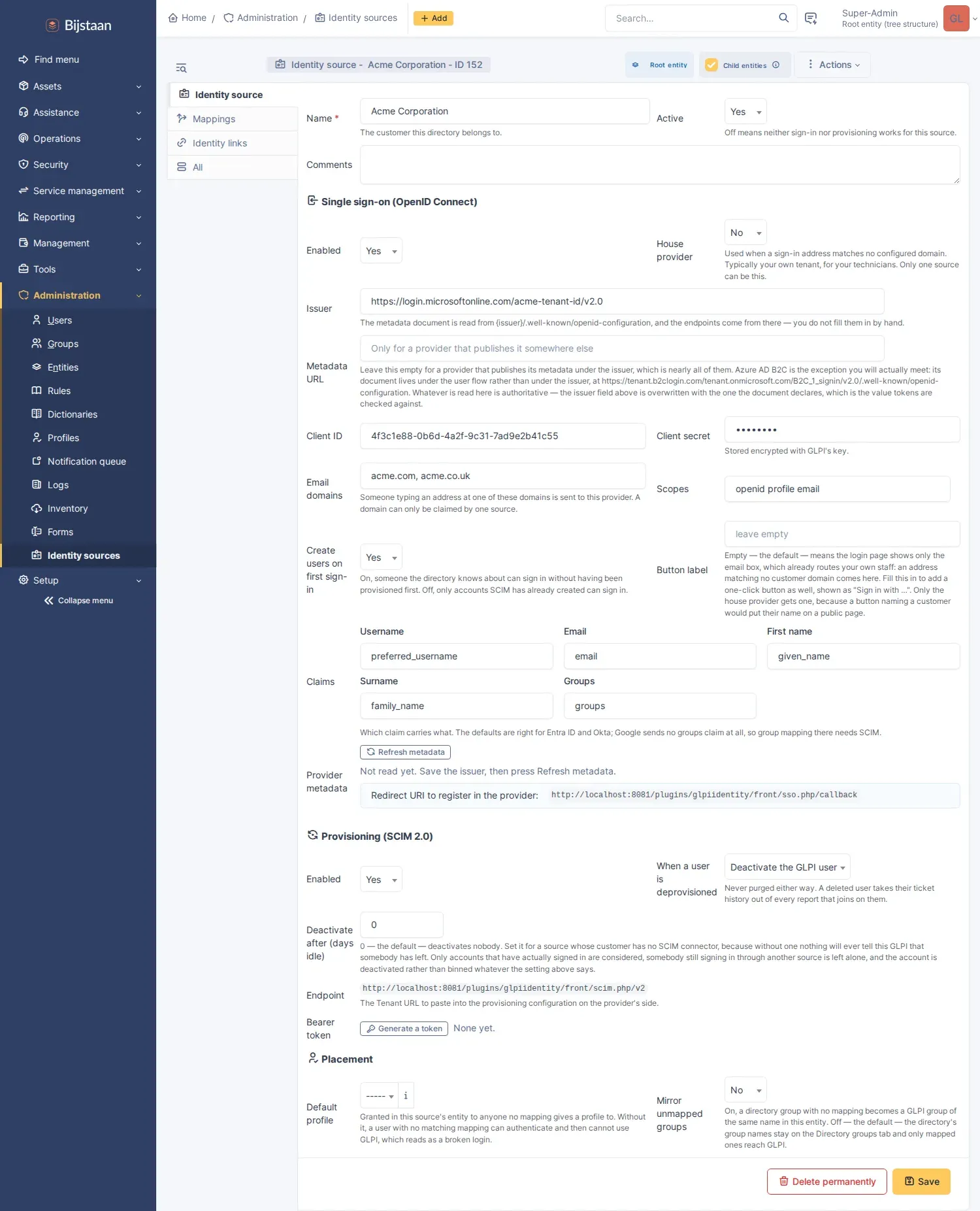
| Section | What it is |
|---|---|
| Single sign-on | The issuer, client id and secret, which claims carry what, and the email domains that route here |
| Provisioning | The SCIM endpoint URL and its bearer token |
| Placement | The default profile, and whether unmapped directory groups get mirrored |
The redirect URI to register with the provider is shown on the form and is the same for every source:
https://your-glpi.example.com/plugins/glpiidentity/front/sso.php/callbackThe SCIM endpoint is per source and also shown on the form:
https://your-glpi.example.com/plugins/glpiidentity/front/scim.php/v2Press Refresh metadata after saving the issuer: the endpoints come from the
provider’s own .well-known/openid-configuration, not from anything you type.
Press Generate a token for SCIM — displayed once and never again, since only
its hash is stored. A lost token is regenerated, which revokes the old one.
A provider publishing metadata somewhere other than under its issuer needs the Metadata URL filled in instead. Azure AD B2C is the one you will meet: its document lives under the user flow rather than the issuer, and the issuer it then declares is a third URL again. Whatever the document says is authoritative.
Entra ID, Okta, Google Workspace and Keycloak have all been set up against this, including the awkward bits: Entra sends group GUIDs in its token by default, and Google sends no groups at all.
Accounts that already exist
Section titled “Accounts that already exist”A GLPI instance is full of contacts before any of this is switched on. The
first time one signs in through their provider the sign-in is refused: a GLPI
account with that username exists and no link says this source owns it. That
refusal is the same one that stops a directory provisioning itself an admin.
The Identity links tab on a source is where that is answered. It lists what the source owns, and underneath it the accounts in the source’s entity that hold an email address and belong to nobody yet. Ticking them, or Link all listed, records an invitation.
An invitation grants nothing on its own. It is claimed the first time somebody signs in through that provider presenting a verified address the account already holds, and never again; a link bound once is never rebound by a login. So an account changes hands only when an administrator and the provider both say so.
Two accounts invited with the same address is refused rather than guessed at.
A link bound to a subject that no longer exists — a tenant migration, a rebuilt IdP, a person deleted and recreated — is reopened, clearing the subject and leaving the invitation for the next sign-in to claim. Unlinking is the other direction: the source no longer owns the account.
The login page
Section titled “The login page”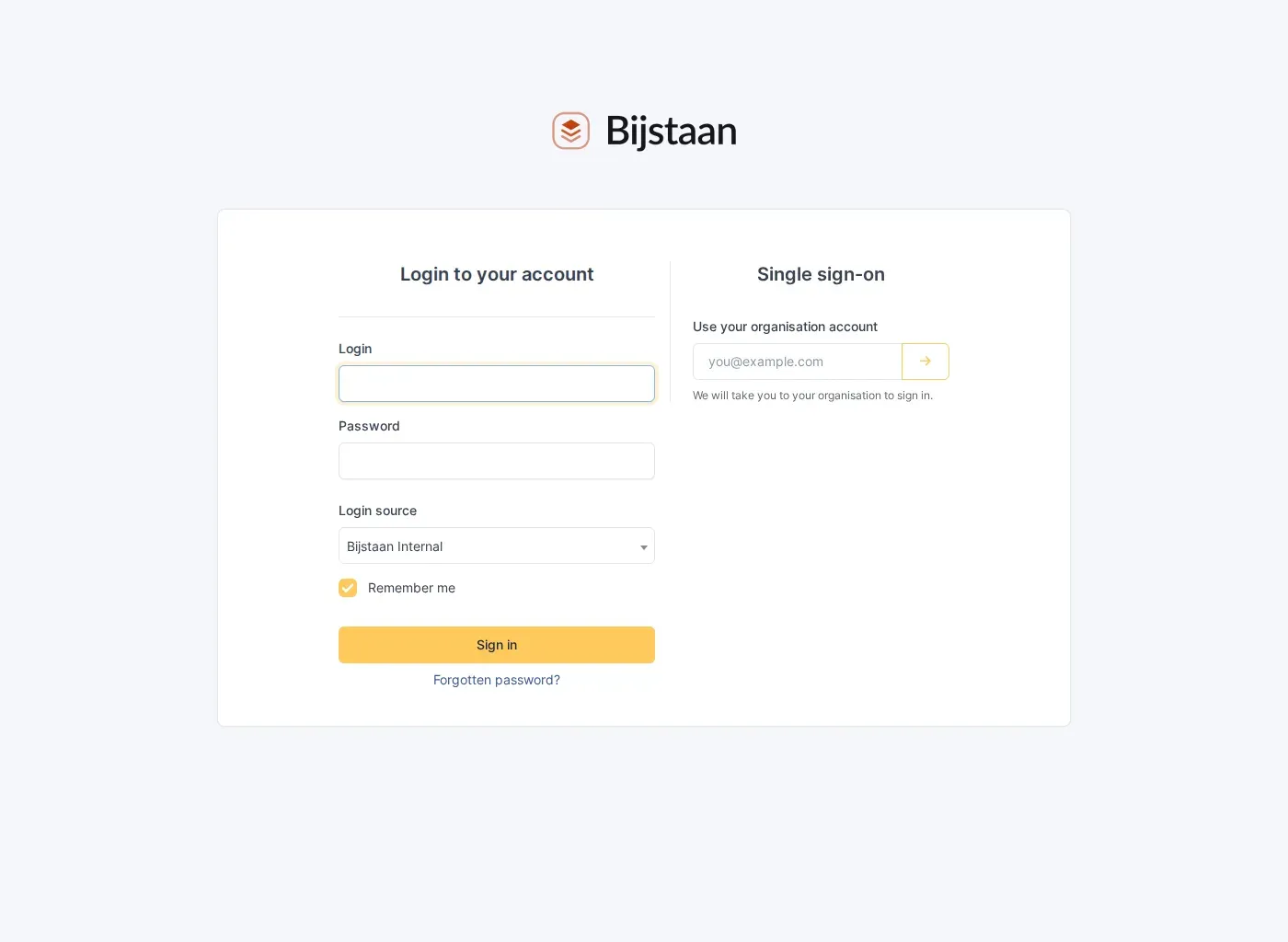
One box beside GLPI’s own password form. It asks for an email address rather than showing a list of providers: that list would be a directory of who your organisations are, and their employees do not know which of a dozen providers is theirs anyway. An address at a claimed domain goes to that organisation’s provider; one at no claimed domain falls back to the house provider.
A domain can be claimed by exactly one source, enforced on save. Two organisations claiming the same domain is not an ambiguity to break at sign-in time; it is a misconfiguration that would route one organisation’s people into another’s entity.
There is no “Sign in with us” button by default — it would be a second primary action next to GLPI’s own Sign in, which reads as a choice rather than a shortcut. Filling in a source’s Button label adds one. Only the house provider can have one; a button naming an organisation would put their name on a public page.
Single sign-on only
Section titled “Single sign-on only”Switching Keep the username and password form off removes GLPI’s own login controls from the page:
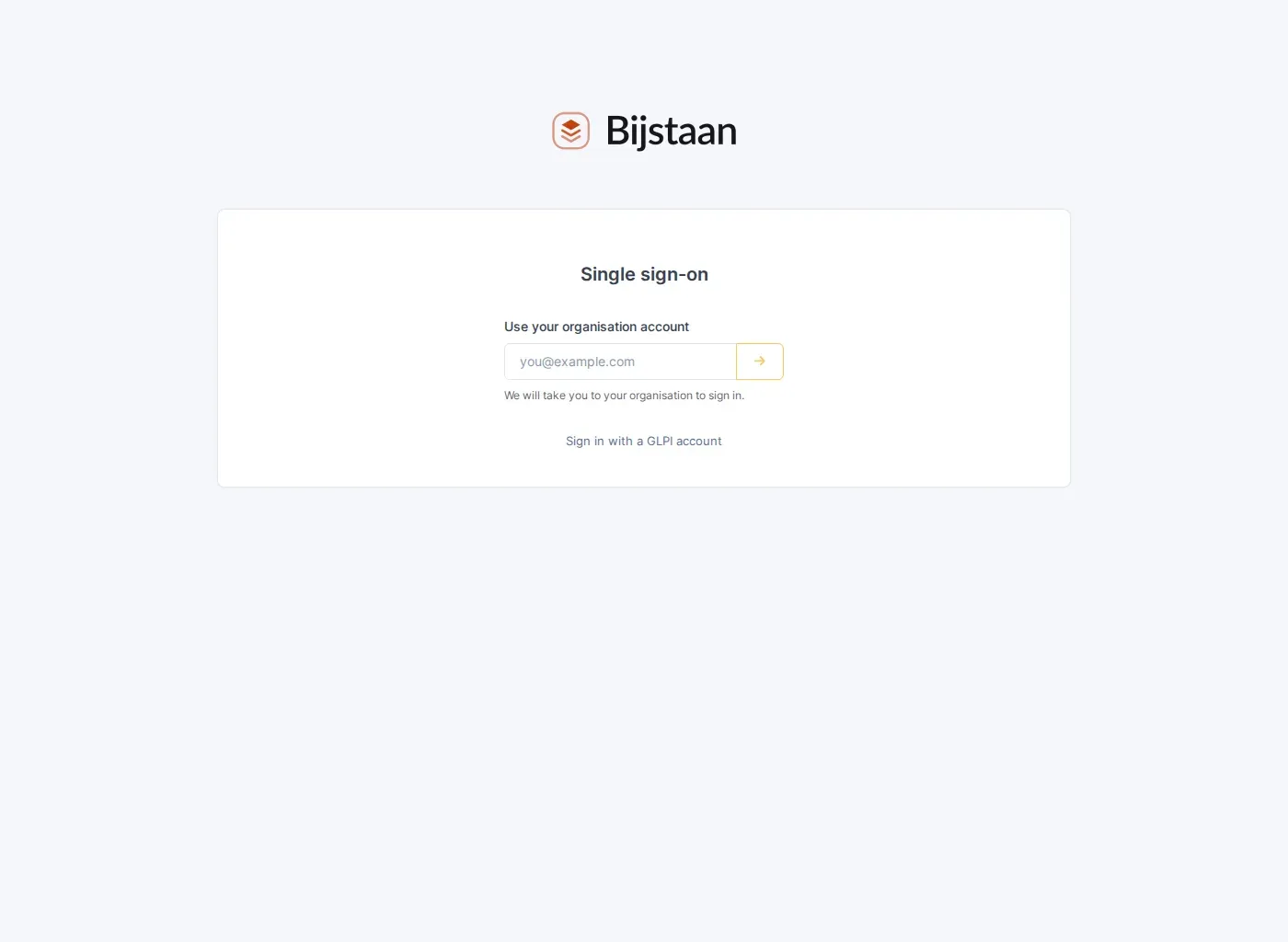
Removed, not hidden — a hidden password field is still filled by autofill and still submitted.
Two things stop this locking you out:
index.php?local=1always shows the form. Not a bypass; it still wants valid credentials, and the link on the page points at it.- It only applies while single sign-on can work. The markup that removes the local controls is emitted as part of the sign-in block, and that block renders only for a source that is ready. Break every provider and the password form is back. That is a property of the ordering rather than a check somebody has to remember, and there is a test for it.
This changes the login page, not what GLPI accepts. A password still works
for any account that has one. What makes the posture sound is that accounts this
plugin provisions are created with authtype = EXTERNAL and no password at all,
so the only accounts a password can reach are the GLPI-internal break-glass set.
The block renders inside GLPI’s login form, which is a trap if you touch it: a
nested <form> is dropped by the HTML parser, a <button> without an explicit
type submits the login form, and a required field stops GLPI’s own password
login working at all. Nothing this plugin renders is a form, has a name, is
required, or is a submit button.
Mapping
Section titled “Mapping”Every rule that matches applies; this is not first-match-wins. Someone in both
Executive and IT Staff gets the VIP group and the Technician profile.
Rules belong to a source, not the instance. GLPI has a good global authorisation-rules engine, and a single global list is the wrong shape here: forty entities’ rules in one ordered list, where the isolation between them depends on every rule remembering to test which directory it came from.
Group membership reaches a mapping by two routes and needs only one:
- the groups claim in the id token, at sign-in;
- the directory groups recorded from SCIM’s
/Groupsendpoint.
The second is what makes group mapping work where the first is unavailable, and is why SCIM groups are stored as the organisation’s groups rather than mirrored into GLPI’s group tree. Mirroring is available and off by default: one shared tree filling up with a dozen organisations’ “All Staff” helps nobody.
Users and Groups: create, read, replace, patch, delete, one filter comparison,
index paging. Bulk, sort, ETags and /Me are declared unsupported in
ServiceProviderConfig rather than half-built — a connector reads that document
and adapts, and a half-built feature is one it will trust.
The filter grammar is one comparison, attribute eq "value" and its sw/co
siblings, which is what every connector sends when asking “do you already have
this person?”. Anything else is refused with invalidFilter rather than guessed:
a connector that gets an honest 400 falls back to listing, while one that gets a
wrong answer overwrites the wrong person.
When there is no connector
Section titled “When there is no connector”Deprovisioning only happens because a SCIM request asked for it, so a source whose organisation has no connector — Azure AD B2C and Zitadel are service providers rather than provisioning clients, and Google Workspace needs a paid tier — never hears that anybody has left.
Deactivate after (days idle) on a source is the answer, off (0) until
somebody sets it. It is narrower than it sounds:
- only accounts that have actually signed in are considered, so an invitation nobody took up never deactivates a long-standing contact;
- the last sign-in is taken across every source the person is linked to, so a consultant working for two of the organisations you support is not idle because one has not seen them;
- they are deactivated, never binned, whatever When a user is deprovisioned says. “Has not signed in lately” is a weaker statement than “the directory says they are gone”.
glpi-ai tools
Section titled “glpi-ai tools”| Tool | Answers |
|---|---|
identity_status |
Why one person can or cannot sign in: linked or not, active or not, and what their recent attempts did |
identity_events |
What has been failing across the providers — refusals, denials, deactivations, group syncs |
“They can’t log in” is the most common ticket a service desk takes. An account that was never provisioned, one the organisation’s directory deactivated last night, and one being refused by a mapping rule all look identical from outside, and none is a forgotten password.
identity_status returns a one-line reading alongside the facts, because the
combination is what means something: a disabled GLPI account refuses every
sign-in however healthy the provider is. identity_events answers the other
shape — a run of refusals at the same minute is a tenant problem, not eleven
forgotten passwords.
Both are gated on plugin_glpiidentity_source, the same right the pages use; the
event log carries denial reasons and IP addresses.
Read only, and this is the plugin where that matters most. The code beside these tools creates accounts, disables them and maps them into profiles. A model that could provision could grant access to your GLPI, and one that could deprovision could lock a real person out.
Install
Section titled “Install”# from the GLPI root — the directory must be named for the plugin key,# which is not the repository namegit clone https://github.com/bijstaan/glpi-identity.git plugins/glpiidentityphp bin/console plugin:install -u glpi glpiidentityphp bin/console plugin:activate glpiidentitydocker compose -p glpi exec glpi sh -c 'cd /var/www/glpi/plugins/glpiidentity && tests/run.sh'Two suites, no real credentials and no network egress.
tests/scim.phpdrives the real HTTP endpoint rather than calling the server class. Half of what makes a SCIM endpoint work is outside the handler — URL routing, the exemption that lets a request with no GLPI session through, the Authorization header surviving the web server, the content type — and a test calling the class directly would pass on a plugin nobody could reach. It also tests tenancy from the wrong side: Beta’s token asking for Acme’s user, Beta’s token adding Acme’s user to a group.tests/oidc.phpsigns in againsttests/mock-idp.php, a provider that signs its tokens properly. The value is in the negative cases, each a named attack: a token signed with the wrong key, from a different issuer, issued for a different client, echoing the wrong nonce, and a callback carrying the wrong state. A mock returning unsigned tokens would let every one of those checks rot unnoticed.
Layout
Section titled “Layout”setup.php hooks, the firewall exemption and the stateless-path declaration that SCIM needshook.php install/uninstall: six tables, one right, three cron taskssrc/Source.php one organisation's identity configurationsrc/Link.php the fact that a GLPI user came from a sourcesrc/Mapping.php one rule, and the form for itsrc/Mapper.php applying rules, and the dynamic/manual splitsrc/Provisioning.php creating, updating and retiring GLPI userssrc/SignIn.php verified claims → a GLPI sessionsrc/IdpGroup.php a group the directory told us aboutsrc/EventLog.php who signed in, what was provisioned, what was refusedsrc/Oidc/Flow.php the authorisation-code flow and its checkssrc/Scim/ the SCIM server: routing, filters, resources, schemasfront/sso.php start and callbackfront/scim.php the SCIM endpointTwo GLPI details, if you extend this:
$_SERVER['PATH_INFO']is always empty. GLPI 11 routes every request through Symfony’s front controller, soSCRIPT_NAMEis/index.phpand the legacy script isrequired without PHP computing a path info. The information is inREQUEST_URI; seeUrl::pathAfter().- The firewall and the session manager are two separate opt-outs.
Firewall::addPluginStrategyForLegacyScripts(..., STRATEGY_NO_CHECK)stops GLPI redirecting an unauthenticated request to the login page.SessionManager::registerPluginStatelessPath(...)stops it starting a session and, the part that bites, stops the CSRF listener rejecting every POST, PUT, PATCH and DELETE. SCIM needs both;sso.phpneeds only the first, being GET-only and wanting a session.
Independence
Section titled “Independence”We have never had a GLPI Network subscription. We have not seen the source of GLPI’s “Exclusive” plugins, or their screens, or their docs. Nothing in here came from them.
It was built from GLPI’s own source, which is GPL and public, and from its API. That is the whole list.
If it looks like theirs in places, that is because core only gives you so many places to hook into.
GLPI is a trademark of Teclib’. This plugin is not affiliated with Teclib’ or the GLPI project.
Licence
Section titled “Licence”GPL-3.0-or-later, the same licence as GLPI. The plugin is loaded into GLPI’s process and extends its classes, so it is a derivative work. See LICENSE.